 ELISSA Wiki
Installation
This page offers a tutorial on a ROS setup as required for the operation and development of the ELISSA environment.
Table of Content:
Installing ROS
DISCLAIMER Beware that the ROS installation is more complicated for newer versions of Ubuntu and may cause packages to break. It is therefore strongly recommended to use Ubuntu 20.04. Using a newer version of Ubuntu will likely cause many, many issues!!!
Standard Installation on Ubuntu 20.04
This is the standard ROS installation with bash setup included.
Currrent ROS version : NOETIC
- The suggested operating system for ROS is Linux (more specifically the Ubuntu or Debian distributions) so make sure to have it installed in your machine. There are experimental versions avaiable for Windows and Arch Linux. Refer to the ROS documentation for further information on experimental versions.
Beware that the ROS installation is more complicated for newer versions of Ubuntu. It is recommended to use Ubuntu 20.04. If you want to use a newer version see the guide below.
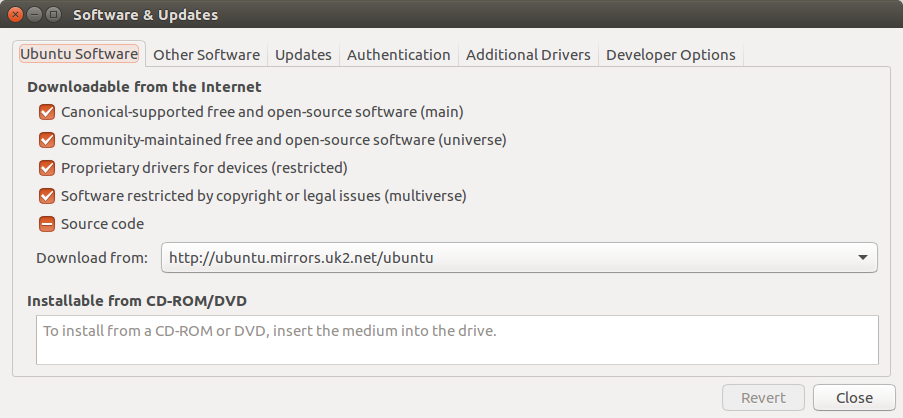
- Configure your Ubuntu repositories to allow “restricted,” “universe,” and “multiverse.”
Do this by going into your “Software & Updates” application under the Ubuntu Software Tab and checking all required boxes.
- Update your Sources List to accept software from packages.ros.org by entering the following command:
sudo sh -c 'echo "deb http://packages.ros.org/ros/ubuntu $(lsb_release -sc) main" > /etc/apt/sources.list.d/ros-latest.list' - Set up your keys by entering the following commands:
sudo apt install curl curl -s https://raw.githubusercontent.com/ros/rosdistro/master/ros.asc | sudo apt-key add - - Install some additional dependcies:
sudo apt install curl python3-pil python3-pil.imagetk - Update your system before the installation
sudo apt update - Now start the full ROS installation with the following command. See the ROS installation Guide for more detailled information on different installation commands. The here provided command installs the full ROS desktop package.
sudo apt install ros-noetic-desktop-full - Now all thats left is to format your bash terminal to operate in the ROS environment. The following command formats the bash terminal once.
source /opt/ros/noetic/setup.bashIf you want to automatically source this script every time a new terminal is launched use the following commands once.
echo "source /opt/ros/noetic/setup.bash" >> ~/.bashrc source ~/.bashrc - Check whether your installation was successfull by running
roscore
ROS is now succesfully installed on your workstation. You can see the following tutorials on how to set up a catkin workstation and how to clone the ELISSA repos to finallize your setup.
Setting up a catkin Workspace
To create a catkin workspace that holds all code and helps to build the project use the following commands.
mkdir -p ~/catkin_ws/src
cd ~/catkin_ws/src
catkin_init_workspace
cd ~/catkin_ws
catkin_make
echo "source ~/catkin_ws/devel/setup.bash" >> ~/.bashrc
source ~/.bashrc
Adding ELISSA repositories
To be able to launch all scenarios in the ELISSA environment a multitude of ROS packages are required. These can be found in the ELISSA Git and should be cloned into the catkin_ws/src directory.
Clone all required repositories into the src folder.
The minimum required repositories to run simulations are:
- elissa3
- elissa3_drap
- elissa3_fad
- elissa3_gazebo
- elissa3_gnc
- elissa3_gui
- elissa3_hamilcar
- elissa3_hamilcar_OBS
- elissa3_hannibal
- elissa3_mvm
- elissa3_issi
Network Configuration
You can find a comprehensive networking guide here: Free-Flyer on-board network setup
Setting up VS Code
tbd
Adding additional ROS Packages
Installing additional ROS packages is done through the command line with commands of the following syntax:
sudo apt-get install ros-${ROS_DISTRO}-${ROS_PKG}
The ROS distribution of ELISSA is Noetic. Installing the ROS Serial package for example would be achieved by entering the following commands into the terminal:
sudo apt-get install ros-noetic-rosserial-arduino
sudo apt-get install ros-noetic-rosserial